
백엔드 엔지니어 이재혁
[MSA 전환기] Day 2 - 타임아웃 및 http/2 설정 본문
어제는 API Gateway를 만들어서 MSA 환경의 기본 바탕을 만들었다면,
오늘은 API Gateway가 역할을 제대로 할 수 있도록 설정을 좀 해주었다.
오늘 요약

추가 문제
Netty를 사용할 때, http/2 통신을 함에도 http/1.1 로그가 찍히는 문제 원인 파악
목차
타임아웃 및 커넥션 풀 설정
upstream http/2 설정
WireShark로 검증
http/2 통신을 하는데도 http/1.1 로그가 찍힌 이유 (Netty 관련)
자세히 알아보기
1. 타임아웃 및 커넥션 풀 설정
무한 대기로 인한 리소스 낭비 방지를 위해 `connect-timeout`과 `response-timeout`을 설정하자.
이어서 `connection pool` 설정을 더해 커넥션 생성에 따른 오버헤드도 최소화하고자 했다.
spring:
  cloud:
    gateway:
      httpclient: # 글로벌 설정
        connect-timeout: 3000 # 3s
        response-timeout: 10000 # 5s
        pool:
          max-idle-time: 65s # 커넥션 유지할 시간 (keep-alive)
          max-connections: 200
          acquire-timeout: 20000 # 풀에서 커넥션 기다리는 최대 시간
upstream http/2 요청
Spring Cloud Gateway에 http/2 설정을 위한 클래스를 만들어주었다.
@Configuration
public class Http2UpstreamConfig {

    @Bean
    public HttpClientCustomizer http2ClientCustomizer() {
        return httpClient -> httpClient.protocol(HttpProtocol.H2C);
    }
}
참고로, TLS 인증서는 발급받지 않고, 로컬에서 테스트할거라 h2c로 구성했다.
(h2c는 `http2cleartext`를 말한다. 암호화되어 있지 않은 평문이라는 것)
백엔드 http/2 활성화
Spring MVC 백엔드의 `application.yaml` 설정. http/2를 활성화하자.
server:
  http2:
    enabled: true
로그로 확인하기
http/2로 통신을 하는지 확인해보자. Spring Cloud Gateway `application.yaml` 설정에 netty 로깅 추가
logging:
  level:
    reactor.netty.http.client: DEBUG
로그
[gateway] [ctor-http-nio-5] r.n.http.client.HttpClientOperations     : [0c4fc870, L:/127.0.0.1:10985 - R:localhost/127.0.0.1:8081](H2 - -1) New HTTP/2 stream
[gateway] [ctor-http-nio-5] r.netty.http.client.HttpClientConfig     : [0c4fc870, L:/127.0.0.1:10985 - R:localhost/127.0.0.1:8081](H2 - -1) Initialized HTTP/2 stream pipeline AbstractHttp2StreamChannel$3{(reactor.left.h2ToHttp11Codec = io.netty.handler.codec.http2.Http2StreamFrameToHttpObjectCodec), (reactor.left.httpTrafficHandler = reactor.netty.http.client.Http2StreamBridgeClientHandler), (reactor.right.reactiveBridge = reactor.netty.channel.ChannelOperationsHandler)}
[gateway] [ctor-http-nio-5] r.netty.http.client.HttpClientConnect    : [0c4fc870/1-1, L:/127.0.0.1:10985 - R:localhost/127.0.0.1:8081] Handler is being applied: {uri=http://localhost:8081/api/caregivers, method=GET}
[gateway] [ctor-http-nio-5] r.n.http.client.Http2ConnectionProvider  : [0c4fc870/1-1, L:/127.0.0.1:10985 - R:localhost/127.0.0.1:8081] Stream opened, now: 1 active streams and 100 max active streams.
[gateway] [ctor-http-nio-5] r.n.http.client.HttpClientOperations     : [0c4fc870/1-1, L:/127.0.0.1:10985 - R:localhost/127.0.0.1:8081] Received response (auto-read:false) : RESPONSE(decodeResult: success, version: HTTP/1.1)
HTTP/1.1 200 OK
# ...
`(H2 - -1) New HTTP/2 stream` → http/2로 요청을 하고 있기는 한데
`RESPONSE(decodeResult: success, version: HTTP/1.1)` → http/1.1가 찍힌다.
http/2 요청에 실패한건가??
WireShark로 검증
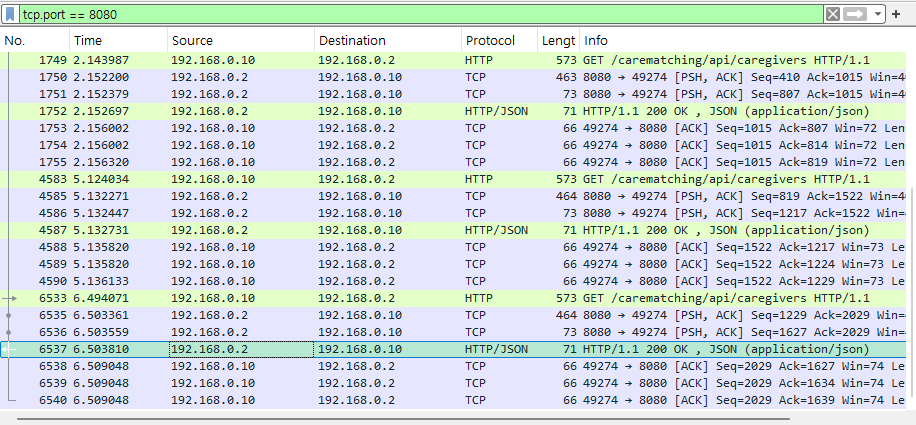
로컬 네트워크(192.168.0.10 / 휴대폰)에서 `http://192.168.0.2:8080/carematching/api/caregivers` 요청을 했다.
클라이언트 ↔ 서버:8080(API Gateway)는 `HTTP/1.1` 기반 통신 중
8080 (API Gateway) ↔ 8081 (백엔드)는 `HTTP/2` 기반 통신 중
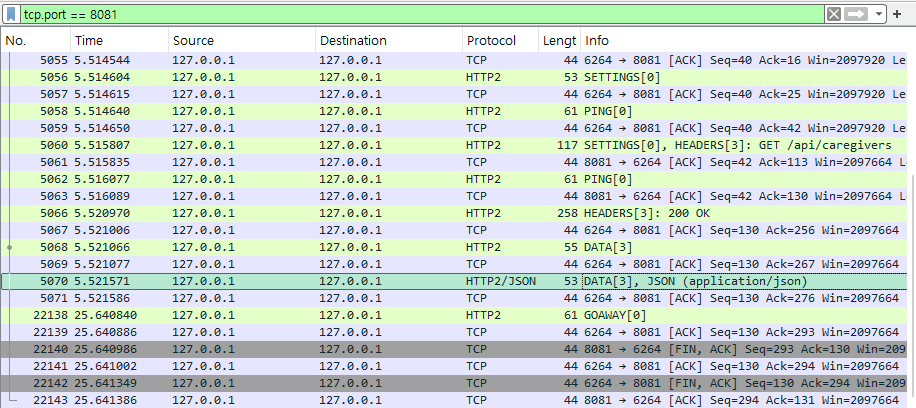
실제 네트워크 통신은 HTTP/2로 잘 이뤄지고 있는 것 같은데, API Gateway의 로그는 왜 저런 것일까?
결론: Netty의 의도된 HTTP/1.1 구현체 사용
컴퓨터에서 이것저것 해봐도 http/2 통신이 제대로 되고 있는 것 같은데... 온라인에 완전히 같은 사례가 있었다.
Netty의 issue로 등록된 내용: HTTP/1.1 is being logged and recorded by metrics even though HTTP/2 is enabled
it records certain HTTP/1.1 logs that I don't understand, despite observing only HTTP/2 requests in Wireshark.
Wireshark에는 http/2 통신만 보이는데 http/1.1 로그가 찍히는 이상한 상황이 완전히 같았다.

이에 대한 netty 메인테이너 분의 답변
HTTP/2 pool uses HTTP/1.1 pool for establishing connections to the remote.
그러니까, TCP 연결 관리는 HTTP 버전과 관계없이 동일하기 때문에 기존의 HTTP/1.1 구현체를 그대로 사용해서 관리하고, TCP 연결 수립이 끝나면 HTTP/2 풀이 데이터 통신을 시작한다.
그래서 HTTP/1.1 구현체의 로그가 나와서 HTTP/1.1이 찍힌거다...
`x-http2-stream-id: <filtered>` 이런 로그는 http/2에서만 나오는 것이기 때문에 HTTP/2 통신이 잘 되고 있던거였다.
downstream 설정?
Spring Cloud Gateway는 downstream에 대해 http2를 끈 상태로 뒀다.
Nginx는 아직 reverse proxy에 대해서 http/2를 지원하지 않기 때문.
Nginx에서 http/2를 지원하기 위한 PR이 열려서 개발이 활발하게 진행되고 있다. 머지 않아 http/2를 지원할지도?
업데이트: 위 PR이 받아들여지고, Nginx 1.29.4부터 upstream http/2가 지원된다.
'케어매칭 서비스 배포' 카테고리의 다른 글
| 결제 시스템: Enum을 활용한 유한 상태 기계 만들기 (0) | 2025.11.11 |
|---|---|
| [MSA 전환기] Day 4 - MS별 버전 관리, CORS 관리 (0) | 2025.11.04 |
| [MSA 전환기] Day 1 - 설계, API Gateway 만들기 (0) | 2025.10.30 |
| 컨테이너 환경 Nginx에 HTTPS 적용 및 인증서 자동 재발급 (0) | 2025.09.24 |
| 케어매칭 AWS 프리티어 배포기 (0) | 2025.07.12 |


